File permissions are the access control layer every Linux admin interacts with—often daily when a web server cannot read a static file, a script "works for me" as root but fails under systemd, or SSH refuses a private key with lax modes. Unlike Windows ACLs, Unix permissions are compact: owner, group, and others each get read, write, and execute bits. Extended ACLs and SELinux contexts add depth, but the chmod/chown foundation solves most homelab and developer issues.
This guide explains permission notation, symbolic and octal chmod, ownership changes, setuid/setgid/sticky bits, umask defaults, and practical recipes for Docker bind mounts, web roots, and SSH keys.
Before you begin
Identify the acting user for a failing command:
whoami
id
Inspect target object:
ls -l /path/to/file
ls -ld /path/to/directory   # -d for directory itself, not contents
namei -l /long/nested/path   # traverse path permissions
Remember: directories need execute (x) permission to enter (cd) even if you can list (r) them. Files need x to execute as programs or scripts with shebangs.
Reading permission strings
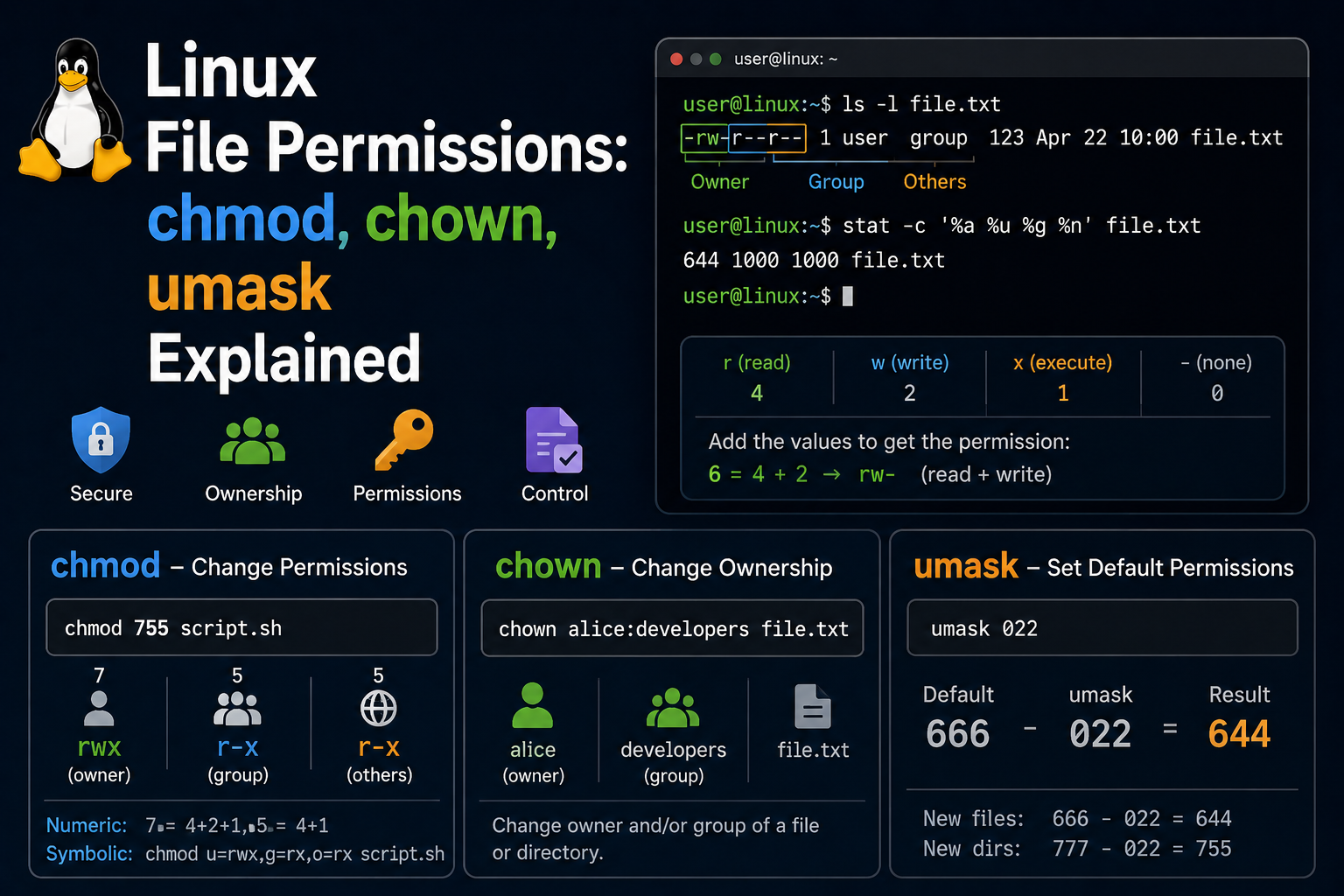
Example: -rw-r----- 1 deploy www-data 4096 May 20 10:00 app.conf
| Field | Meaning |
|---|---|
- |
File type (d directory, l symlink) |
rw- |
Owner: read+write |
r-- |
Group: read only |
--- |
Others: no access |
deploy |
Owner user |
www-data |
Group |
chmod: symbolic and octal
Symbolic (human-readable):
chmod u+x script.sh        # owner +execute
chmod g-w secret.txt       # group -write
chmod o-rwx private/       # others no access
chmod a+r public.txt       # all +read
chmod u=rw,go=r file       # set exactly
Octal (compact, common in docs):
| Octal | Bits | Meaning |
|---|---|---|
| 4 | r | read |
| 2 | w | write |
| 1 | x | execute |
chmod 644 file.txt    # rw-r--r--
chmod 755 script.sh   # rwxr-xr-x
chmod 700 ~/.ssh      # rwx------ directory
chmod 600 ~/.ssh/id_ed25519
Recursive caution:
chmod -R 755 /var/www/site   # OK for static site dirs
chmod -R 777 /anything       # Never on servers
Recursive chmod on mixed file/dir trees may need find:
find /var/www/site -type d -exec chmod 755 {} +
find /var/www/site -type f -exec chmod 644 {} +
chown and chgrp
Change owner and group (requires root for other users' files):
sudo chown deploy:deploy app/
sudo chown root:www-data /var/www/html
sudo chgrp docker /var/run/docker.sock   # example; package sets this
sudo chown -R $USER:$USER ~/project      # fix home dir after sudo mistakes
chown accepts user:group or user.group syntax depending on shell escaping—prefer colon form.
umask: default permissions for new files
umask
umask 022   # common default → files 644, dirs 755
umask 077   # paranoid → files 600, dirs 700
Add to ~/.bashrc or /etc/profile for persistence. Developers creating shared group projects often use umask 002 with a common group.
Special bits: setuid, setgid, sticky
setuid (4xxx): Executed file runs as owner (e.g., passwd).
setgid (2xxx): On dirs, new files inherit group; on executables, run as group.
sticky (1xxx): On dirs like /tmp, only owner deletes own files.
chmod 4755 binary        # setuid
chmod 2775 shared_dir    # setgid dir for team collaboration
ls -ld /tmp              # drwxrwxrwt sticky bit 't'
Misapplied setuid binaries are security risks—avoid creating your own unless you understand implications.
ACLs when owner/group/others are not enough
Install ACL tools:
sudo apt install acl       # Debian/Ubuntu
sudo dnf install acl       # Fedora
Grant single user read on a file:
setfacl -m u:colleague:r-- report.pdf
getfacl report.pdf
Default ACLs on directories propagate to new files—useful for shared project folders.
SELinux and AppArmor contexts (awareness)
On Fedora/RHEL, wrong SELinux context breaks nginx reading files:
ls -Z /var/www/html
sudo restorecon -Rv /var/www/html
Ubuntu AppArmor profiles may restrict services similarly—check logs before chmod-spamming.
Practical recipes
SSH private key:
chmod 700 ~/.ssh
chmod 600 ~/.ssh/id_ed25519
chmod 644 ~/.ssh/id_ed25519.pub
Web root (nginx/apache):
sudo chown -R root:www-data /var/www/mysite
sudo find /var/www/mysite -type d -exec chmod 755 {} +
sudo find /var/www/mysite -type f -exec chmod 644 {} +
Script executed by cron/systemd:
chmod 750 /usr/local/bin/backup.sh
chown root:backup /usr/local/bin/backup.sh
Docker bind mount "permission denied": Container UID/GID may not match host. Align with:
chown -R 1000:1000 ./data
# or run container with --user $(id -u):$(id -g)
Server hardening patterns
Web applications: Run services as dedicated users, not root. Keep code read-only except upload directories:
sudo useradd -r -s /usr/sbin/nologin myapp
sudo chown -R root:myapp /opt/myapp
sudo chmod -R 750 /opt/myapp
sudo chmod 770 /opt/myapp/uploads
Secrets: .env files should be 600 owned by the service user. Never commit secrets to git—permission bits are last-resort defense when repos leak.
SSH and keys: Combine chmod 600 on keys with AllowUsers restrictions on servers—permissions alone do not stop privilege escalation if attackers gain user shells.
Shared development directories: Use setgid directories so new files inherit project group membership:
sudo chgrp devteam /srv/project
sudo chmod 2775 /srv/project
sudo usermod -aG devteam alice
Auditing permissions at scale
Before chmod-spamming production:
find /var/www -type f ! -perm 644 -ls
find /var/www -type d ! -perm 755 -ls
Ansible file module enforces desired state reproducibly—better than manual fixes on multiple homelab nodes.
Numeric reference card
| Octal | File typical | Directory typical |
|---|---|---|
| 755 | scripts (executable) | public dirs |
| 644 | config, static HTML | — |
| 600 | secrets, keys | — |
| 700 | private scripts | .ssh, admin dirs |
| 750 | — | group-readable app dirs |
Container and NFS bind mount gotchas
When bind-mounting NFS or SMB shares into Docker, UID mismatches manifest as Permission denied inside containers despite correct host modes. Align container user: directives with NFS anonuid settings or use local volumes for database workloads.
For read-only config mounts:
docker run -v /etc/myapp/config.yaml:ro ...
Read-only binds reduce blast radius when containers are compromised.
Troubleshooting
"Permission denied" but chmod looks correct. Check parent directory execute bit with namei -l. Check SELinux (ausearch, restorecon). Verify mount options (noexec, nosuid).
Cannot write despite ownership. Disk full (df -h), immutable attribute (lsattr), or read-only mount.
Executable script fails. Shebang line (#!/bin/bash), Windows CRLF line endings (dos2unix), or missing interpreter.
Group changes not visible until re-login. newgrp groupname or logout/login refreshes group membership.
sudo works, systemd service fails. Services run as specific users—match file ownership to User= in unit files.
Key takeaways
- Learn to read
ls -loutput fluently—owner, group, and triplet bits explain most access failures. - Prefer least privilege: 644 files, 755 public dirs, 600 secrets, 700
~/.ssh. - Use
findfor recursive dir/file permission splits instead of blindchmod -R. - Combine chown with service users (
www-data, container UIDs) for servers and compose stacks. - Check SELinux/AppArmor and parent path permissions before reaching for 777.
FAQ
What does chmod 777 do?
Grants read/write/execute to everyone—convenient, dangerous on multi-user or internet-facing systems.
Why can't others cd into my home?
Home dirs often drwxr-x--- (750)—others lack execute on directory.
Do I need ACLs at home?
Rarely. Standard owner/group/others plus one group per project suffices for most homelabs.