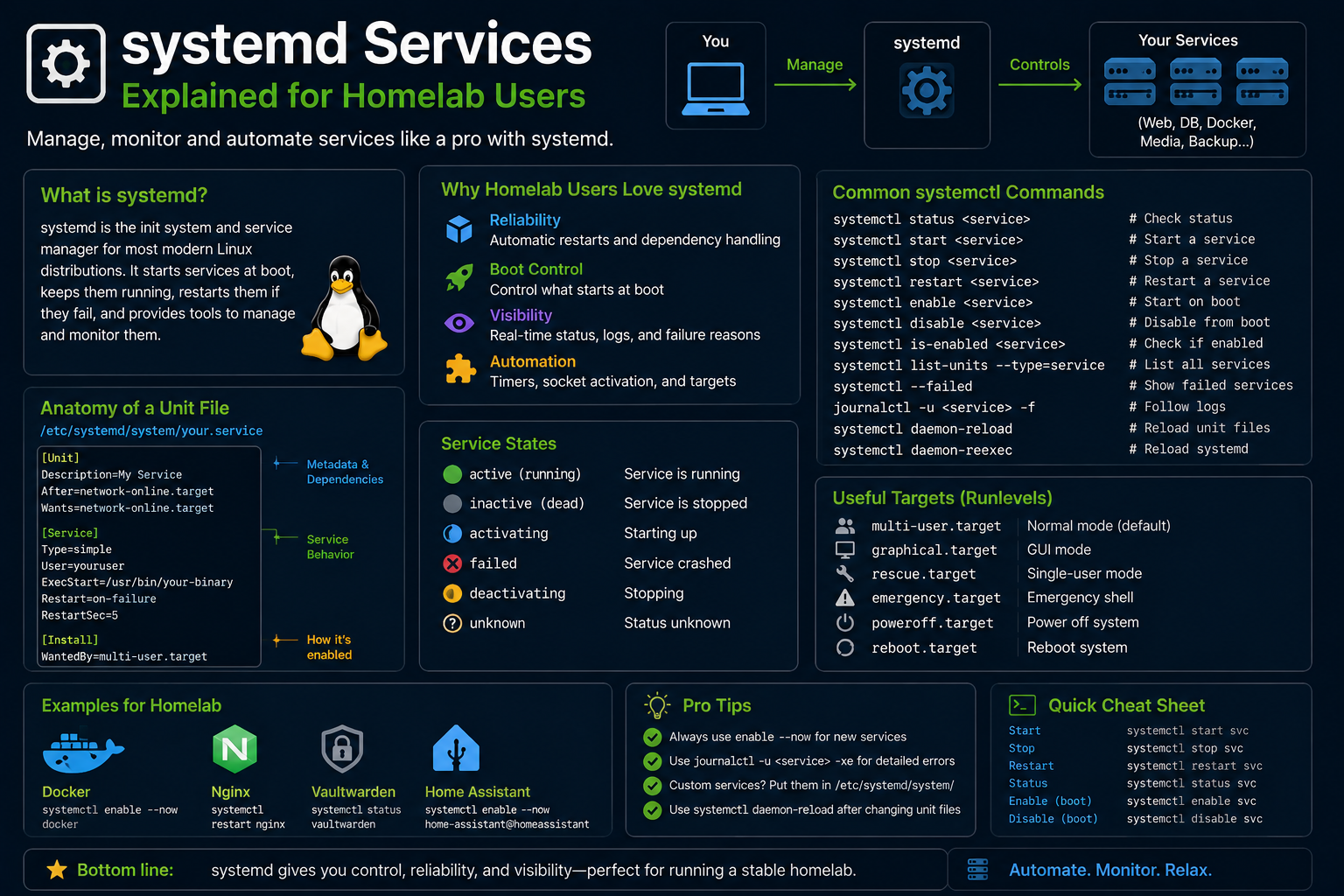
systemd is the init system and service manager on virtually every mainstream Linux distro in 2026—Ubuntu, Fedora, Arch, Debian, RHEL. Homelab operators interact with it constantly: starting Docker, enabling nginx, debugging failed PostgreSQL upgrades, and inspecting why a container host rebooted into emergency mode. Understanding units, targets, journald logging, and dependency ordering separates confident debugging from random reboot loops.
This guide explains systemd concepts for developers coming from Windows services or manual nohup habits—covering unit files, systemctl workflows, timers as cron replacements, overrides, and troubleshooting failed units on headless servers.
Before you begin
Confirm systemd version and PID 1:
systemd --version
ps -p 1 -o comm=
Know unit locations:
| Path | Purpose |
|---|---|
/usr/lib/systemd/system/ |
Package-installed units |
/etc/systemd/system/ |
Administrator overrides and custom units |
~/.config/systemd/user/ |
User session units |
Do not edit vendor units in /usr/lib directly—use drop-in overrides in /etc/systemd/system/unit.d/.
Unit types and naming
Common suffixes:
.service— daemons and one-shot commands.timer— scheduled triggers (cron-like).socket— socket activation.target— groups of units (roughly runlevels).mount/.automount— filesystem mounts
List installed units:
systemctl list-unit-files --type=service
systemctl list-units --type=service --state=running
Essential systemctl commands
sudo systemctl start nginx
sudo systemctl stop nginx
sudo systemctl restart nginx
sudo systemctl reload nginx      # if unit supports reload
sudo systemctl enable nginx        # start at boot
sudo systemctl disable nginx
sudo systemctl status nginx
sudo systemctl is-active nginx
sudo systemctl is-enabled nginx
Mask prevents accidental start (stronger than disable):
sudo systemctl mask example.service
sudo systemctl unmask example.service
Reading service status output
systemctl status docker shows:
- Loaded state (enabled/disabled; path to unit file)
- Active state (running/dead/failed)
- Main PID, memory, cgroup
- Recent log lines from journal
Failed units:
systemctl --failed
journalctl: logs that replace scattered files
journalctl -u nginx                 # unit logs
journalctl -u docker --since today
journalctl -xe                      # recent system errors
journalctl -b                       # current boot
journalctl -f                       # follow live
Persist logs across boots (default on most distros):
sudo mkdir -p /var/log/journal
sudo systemctl restart systemd-journald
Homelab tip: centralize logs with Loki/Vector later—journald remains the first stop locally.
Anatomy of a simple unit file
/etc/systemd/system/homelab-backup.service:
[Unit]
Description=Nightly homelab backup
After=network-online.target
Wants=network-online.target

[Service]
Type=oneshot
User=backup
ExecStart=/usr/local/bin/backup.sh
Nice=10

[Install]
WantedBy=multi-user.target
Reload and enable:
sudo systemctl daemon-reload
sudo systemctl enable --now homelab-backup.service
Type=oneshot for scripts that exit; Type=simple for long-running daemons (default).
Timers instead of cron
/etc/systemd/system/homelab-backup.timer:
[Unit]
Description=Run homelab backup nightly

[Timer]
OnCalendar=*-*-* 02:30:00
Persistent=true

[Install]
WantedBy=timers.target
Enable timer (not just service):
sudo systemctl enable --now homelab-backup.timer
systemctl list-timers --all
Timers offer monotonic scheduling, randomized delays, and unified logging—excellent for homelab maintenance windows.
Drop-in overrides
To add environment variables without editing vendor unit:
sudo systemctl edit docker
Creates /etc/systemd/system/docker.service.d/override.conf:
[Service]
Environment=HTTP_PROXY=http://proxy.local:3128
Then:
sudo systemctl daemon-reload
sudo systemctl restart docker
Targets and boot debugging
Common targets:
multi-user.target— normal server bootgraphical.target— desktop with display managerrescue.target/emergency.target— minimal recovery
Boot analysis:
systemd-analyze
systemd-analyze blame
systemd-analyze critical-chain
Disable slow optional services after identifying culprits—do not disable networking or disk mounts blindly.
User services for developers
Run app without sudo:
systemctl --user enable --now myapp.service
loginctl enable-linger $USER   # start user units at boot without login
Useful for user-level Podman/Docker compose wrappers and dev servers.
Resource limits and cgroups
systemd controls CPU, memory, and IO via unit directives:
[Service]
MemoryMax=2G
CPUQuota=200%
TasksMax=100
Apply to homelab services that occasionally leak memory:
sudo systemctl set-property myservice.service MemoryMax=1G
systemctl show myservice -p MemoryMax
Cgroup v2 is unified on modern distros—systemd-cgtop shows live resource usage per slice.
Security hardening with systemd
Sandbox directives (where supported by application):
[Service]
NoNewPrivileges=yes
PrivateTmp=yes
ProtectSystem=strict
ProtectHome=yes
ReadWritePaths=/var/lib/myapp
Not every third-party unit supports strict sandboxing—test thoroughly. Custom homelab scripts benefit greatly from User= drop privileges and ProtectSystem=.
Socket activation reduces attack surface by starting services on demand:
systemctl list-units --type=socket
Integrating Docker Compose with systemd
Generate units or use restart: unless-stopped in compose. For boot-order dependencies (Traefik before apps):
[Unit]
After=docker.service network-online.target
Requires=docker.service
Some admins wrap docker compose up in oneshot units—ensure RemainAfterExit=yes for Type=oneshot wrappers.
systemd vs cron: when to use which
| Use systemd timers | Keep cron |
|---|---|
| Need journald logging | Legacy scripts expecting cron env |
| Dependency on network targets | Simple @reboot one-liner |
Randomized delay (RandomizedDelaySec) |
Third-party cron-only tools |
Convert cron jobs incrementally—parallel run during migration week to compare output.
Debugging boot and shutdown hangs
systemd-analyze critical-chain shutdown.target
journalctl -b -1 -e   # previous boot end
systemctl list-jobs
Shutdown hangs often involve Docker containers with long stop timeouts—adjust TimeoutStopSec in drop-ins or compose stop_grace_period.
Homelab service ordering example
Typical dependency chain for reverse-proxy stacks:
network-online.target → docker.service → traefik.service → app.service
Express with systemd unit After= and Requires=—avoid circular dependencies between units that mutually call each other on startup.
systemctl cat servicename shows effective unit including drop-ins—always inspect merged config before blaming upstream packages.
Enable LogLevel=debug temporarily in service drop-ins when vendors ask for support bundles—remember to remove after tickets close to avoid journal bloat.
Homelab nodes running dozens of timers should set Persistent=true on calendar timers so missed runs catch up after downtime—not just @reboot maintenance scripts.
Use systemd-run --on-calendar for one-off scheduled tasks during migrations before committing permanent timer units to /etc/systemd/system.
Troubleshooting
Unit fails immediately. journalctl -u unit -b for errors; check ExecStart paths, permissions, and User= privileges.
Changed unit not behaving. Always daemon-reload after edits.
Dependency loops or timeout at boot. Inspect After= / Before= / Requires= chains; systemctl list-dependencies.
Port already in use. Service restart loops—ss -tlnp | grep :PORT.
SELinux denials (Fedora/RHEL). ausearch -m avc -ts recent; adjust policy or labels—not systemd itself.
Emergency mode after fstab error. Boot live ISO, comment bad /etc/fstab line, regenerate UUIDs.
Docker/container units. Prefer compose with restart: unless-stopped or systemd generator units—avoid fighting Docker's restart policies.
Key takeaways
systemctl+journalctlare the primary admin interface on modern Linux—learn them before third-party GUIs.- Custom homelab automation belongs in
.service+.timerunits with explicit dependencies and logging. - Use
systemctl editdrop-ins to survive package upgrades that overwrite vendor units. systemd-analyze blamefinds slow boot services on workstations and mini PCs alike.- User units + linger run dev/homelab apps without root when designed carefully.
FAQ
Is systemd controversial still?
It won practically everywhere; skills transfer across distros.
systemd vs cron?
Cron remains fine for simple schedules; timers integrate logging and dependencies better.
Can I run systemd in Docker?
Usually no for app containers; systemd expects PID 1 on full VMs/bare metal.
Where did syslog go?
Often forwarded to journald; install rsyslog if you need traditional files.
Can I run systemd inside Docker?
App containers should run a single process; systemd expects PID 1 on VMs or bare metal, not typical microservice containers.
How do I restart failed units automatically?
Use Restart=on-failure in [Service] with sensible StartLimitBurst to avoid infinite crash loops.