SSH keys are the standard authentication mechanism for Linux servers, Git hosting, homelab nodes, and cloud VMs. Password logins do not scale, encourage reuse, and attract brute-force bots on any port 22 exposed to the internet. A properly generated ed25519 key pair, loaded in an agent, with correct file permissions and a documented rotation plan, eliminates daily password typing while dramatically improving security posture.
This guide covers key generation, agent usage, deploying public keys to servers, hardening sshd_config, Git integration, and troubleshooting the failures you will see in real homelab deployments.
Before you begin
One key or many? Use separate keys per trust boundary: personal homelab, work, production. Comment fields help identify keys on servers (-C "fetac-laptop-2026").
Passphrase trade-off: Passphrases protect keys at rest on laptops; combine with ssh-agent to avoid typing every connection.
Never share private keys. Public keys (*.pub) go on servers; private keys stay on clients.
Backup keys securely before disk failures—password manager attachments or encrypted offline storage.
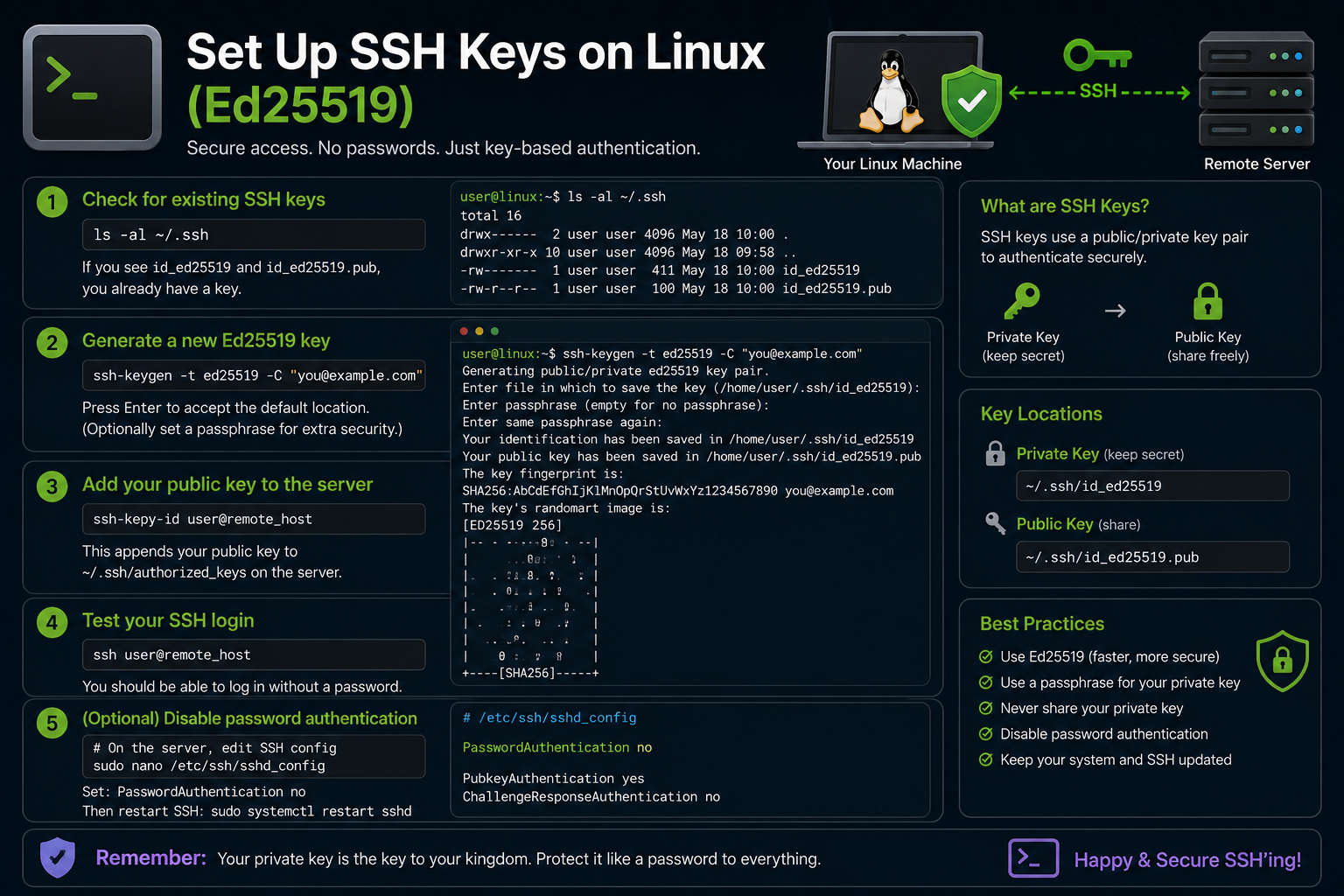
Generate ed25519 keys
ssh-keygen -t ed25519 -a 100 -C "your-label-here"
# Accept default ~/.ssh/id_ed25519 or choose custom path
# Enter passphrase when prompted (recommended)
Verify files:
ls -la ~/.ssh/id_ed25519*
chmod 700 ~/.ssh
chmod 600 ~/.ssh/id_ed25519
chmod 644 ~/.ssh/id_ed25519.pub
For legacy systems lacking ed25519 support, RSA 4096 is fallback:
ssh-keygen -t rsa -b 4096 -C "legacy-compat"
Start ssh-agent and add keys
On desktop sessions, agents often auto-start. Manual workflow:
eval "$(ssh-agent -s)"
ssh-add ~/.ssh/id_ed25519
ssh-add -l    # list loaded keys
Persist agent across sessions using desktop keyring integration or ~/.bashrc snippets—avoid scripting passphrases in plaintext.
Install public key on a server
Method A: ssh-copy-id (easiest)
ssh-copy-id -i ~/.ssh/id_ed25519.pub user@192.168.1.100
Method B: manual append
mkdir -p ~/.ssh
chmod 700 ~/.ssh
echo "ssh-ed25519 AAAA...comment" >> ~/.ssh/authorized_keys
chmod 600 ~/.ssh/authorized_keys
Method C: cloud-init / Ansible / provider UI for VPS templates (Hetzner, DigitalOcean, AWS EC2 key pairs).
Test login:
ssh -i ~/.ssh/id_ed25519 user@192.168.1.100
Client config for homelab scale
~/.ssh/config reduces typing and enforces options:
Host nas
    HostName 192.168.1.50
    User admin
    IdentityFile ~/.ssh/id_ed25519
    IdentitiesOnly yes

Host *.example.com
    User deploy
    ForwardAgent no
Permissions:
chmod 600 ~/.ssh/config
Connect with ssh nas.
Harden server sshd
Edit /etc/ssh/sshd_config (paths vary slightly by distro):
PubkeyAuthentication yes
PasswordAuthentication no
PermitRootLogin no
ChallengeResponseAuthentication no
MaxAuthTries 3
AllowUsers deploy admin
Validate and reload:
sudo sshd -t
sudo systemctl reload sshd
Critical: Keep an existing session open while testing changes in a second terminal—lockouts happen.
Optional enhancements:
- Change default port (security through obscurity only—pair with firewall allowlists).
AllowUsers/AllowGroupsrestrict accounts.- Fail2ban or firewall rate limits on SSH.
Git hosting (GitHub, GitLab, Gitea)
Copy public key:
ssh-keygen -y -f ~/.ssh/id_ed25519   # regenerate pub from private if needed
cat ~/.ssh/id_ed25519.pub
Add to provider UI → SSH keys. Test:
ssh -T git@github.com
git clone git@github.com:user/repo.git
Use separate deploy keys per repo in CI with read-only scope.
Certificates and advanced patterns (awareness)
SSH certificates (smallstep, HashiCorp Vault) scale key management for teams. For homelab, static keys plus inventory docs often suffice until you manage dozens of nodes.
Jump hosts:
Host internal
    HostName 10.0.0.5
    ProxyJump bastion
Hardware security keys (FIDO2/U2F)
YubiKey and similar devices support sk-ssh-ed25519@openssh.com keys on OpenSSH 8.2+:
ssh-keygen -t ed25519-sk -O resident -O verify-required
Resident keys store credentials on the hardware token—excellent for admin access with phishing resistance. Backup codes and secondary keys remain mandatory; losing the only hardware key without backup locks you out.
SSH hardening with 2FA (optional layer)
Combine pubkey auth with libpam-google-authenticator or Duo for high-value bastion hosts:
# /etc/pam.d/sshd — example pattern; test carefully
auth required pam_google_authenticator.so
Keep pubkey-only on internal homelab VLANs; add TOTP on internet-exposed jump boxes.
Inventory and rotation workflow
Maintain a simple spreadsheet or git-managed YAML listing:
- Key label and creation date
- Public key fingerprint (
ssh-keygen -lf id_ed25519.pub) - Hosts where pubkey is deployed
- Rotation schedule
Rotation procedure:
- Generate new key pair.
- Deploy new pubkey to all hosts (keep old key temporarily).
- Verify logins with new key.
- Remove old pubkey from
authorized_keys. - Revoke old key in Git hosting UI.
Automate deployment with Ansible authorized_key module at homelab scale:
- name: Deploy SSH key
  ansible.builtin.authorized_key:
    user: deploy
    key: "{{ lookup('file', '~/.ssh/id_ed25519.pub') }}"
Bastion host pattern for homelab
Expose only a hardened jump box to the internet; internal nodes firewall to bastion IP:
# ~/.ssh/config
Host bastion
    HostName vpn.example.com
    User jump
    IdentityFile ~/.ssh/id_ed25519

Host homelab-*
    ProxyJump bastion
    User admin
    IdentityFile ~/.ssh/id_ed25519_homelab
On internal nodes, /etc/ssh/sshd_config:
AllowUsers admin
PasswordAuthentication no
AllowTcpForwarding no
Combine with WireGuard instead of public SSH when possible—SSH becomes LAN-only over tunnel.
Logging and audit
Enable verbose auth logging temporarily during key migrations:
# Ubuntu/Debian
sudo tail -f /var/log/auth.log

# Fedora
sudo journalctl -u ssh -f
After successful migration, reduce verbosity. Consider auditd rules on bastion hosts tracking authorized_keys modifications.
ssh-agent forwarding caution
ForwardAgent yes in config enables remote hosts to use your local keys—convenient for jump chains, dangerous on untrusted servers. Prefer ProxyJump without agent forwarding when admins on intermediate boxes are not fully trusted.
ssh -A user@host # explicit forward when needed only
Store backup key material encrypted offline; paper printouts of ed25519 public keys help during incident response when laptops are lost.
When revoking compromised keys, remove pubkeys from authorized_keys, Git hosting, CI secrets, and hardware security modules in the same maintenance window—partial revocation leaves backdoors.
For teams, enforce AuthorizedKeysFile paths and audit with configuration management rather than manual edits on each server.
Publish team onboarding docs that show exact ssh-keygen flags and forbidden practices (shared keys, keys without passphrases on laptops).
Troubleshooting
Permission denied (publickey). Wrong key, not loaded in agent, or server lacks matching pubkey. Debug:
ssh -vvv user@host
Check server /var/log/auth.log or journalctl -u ssh.
WARNING: UNPROTECTED PRIVATE KEY FILE! Fix modes: chmod 600 private key, 700 .ssh.
Agent refused operation. Key not added (ssh-add), or wrong SSH_AUTH_SOCK in sudo sessions.
Host key verification failed. MITM warning or rebuilt server—verify fingerprint out-of-band, then:
ssh-keygen -R hostname
Connection timeout. Firewall, wrong IP, or sshd not running: sudo systemctl status ssh.
Too many authentication failures. SSH client offers all keys; use IdentitiesOnly yes and specific IdentityFile.
Key takeaways
- Generate ed25519 keys with passphrases and store private material at
600permissions. - Deploy pubkeys with
ssh-copy-id, then disable password authentication on servers. - Use
~/.ssh/configto tame homelab hostnames, users, and keys. - Test sshd changes in a second session before closing your last working login.
- Separate keys per environment and document fingerprints for rotation.
FAQ
Can I use one key everywhere?
You can, but compromise blast radius increases. Split keys for prod vs lab.
How often rotate?
Annually or on personnel/device changes; rotation is easier with configuration management.
Is SSH on port 22 safe?
With keys-only and firewall allowlists, yes. Bots scan 22 constantly—fail2ban helps if passwords were ever enabled.
Ed25519 vs RSA?
Prefer ed25519 for size, speed, and modern security margins.
Can I use the same key on phone and laptop?
Use separate keys per device when possible; mobile clients often support their own key generation and export workflows.